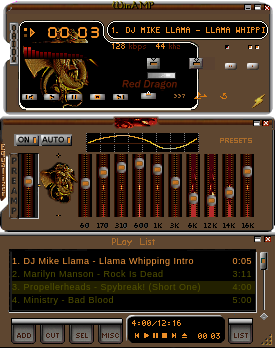
The Reddragon
Windows
theRedDragon.wsz
by L.Larsson 08/21/04
Updated theRedDragon Skin by 337,
works with WinAmp 2 & up.
All windows Skinned
A New & different Look!
Updated Equalizer & VidAMP
All NEW LOOK! w/Updated analyzer.
LL
Installation: v2.7 & above
1. Copy/paste theRedDragon.wsz to the WinAmp
Skins directory.
2. Launch WinAmp, and type Alt-S for the
Skin Browser.
3. Double-click on the 'theRedDragon.wsz'..
or j
6 downloads
0 favorites
0 comments
No comments yet.
Sign in to leave a comment.
0 Comments